Want to know who shared your Instagram post? By checking out Instagram Insights, you can see how many shares your post has had. Unfortunately, Instagram does not show you a full list of people who shared it privately.
If someone shares your original post in their story and gives you a tag, you will probably receive a notification about it. For any other type of sharing done via Direct Messaging, you can only see the total number of shares, not individuals.
A professional Instagram account is the easiest way to see the insights on your post’s sharing activity by simply selecting View Insights.
Table of Contents
Check Your Post Insights
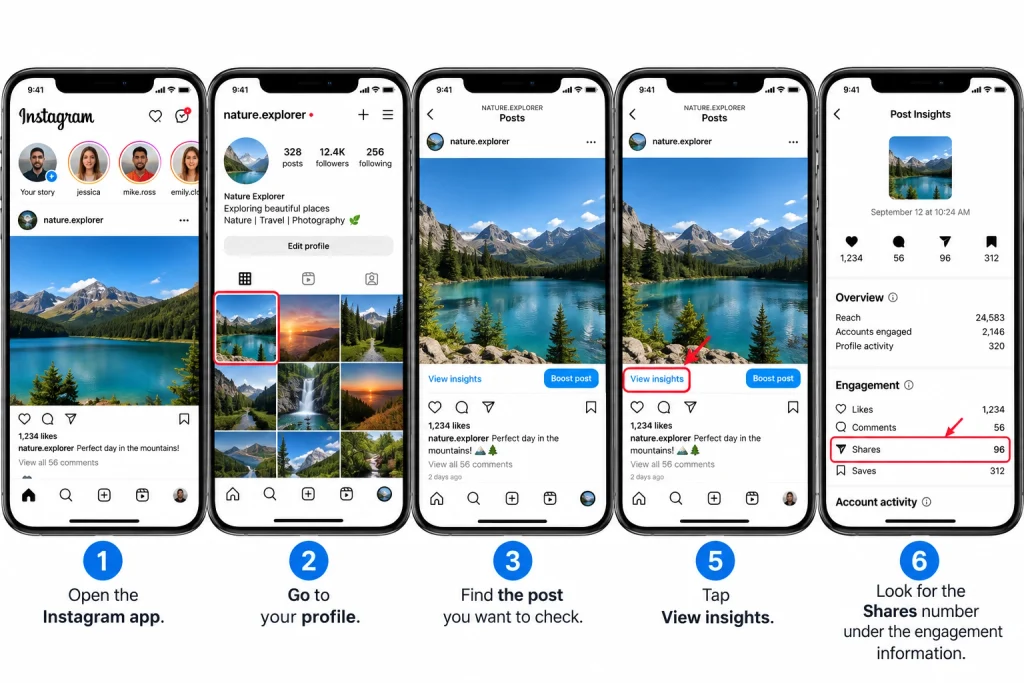
If you have access to Instagram Insights, you’ll be able to see how often users shared your posts. Follow the steps below to find the number of shares on your posts:
Open the Instagram app.
Go to your profile.
Scroll down and locate the post you would like to check.
Click on the post.
Tap on “view insights.”
Find the number of shares in the engagement information.
The number of shares indicates how many times the post was shared but does not usually provide the actual names of the people who shared it.
For instance, if a post shows 25 shares, it means that there were 25 shares recorded by Instagram. However, one individual may have shared that post several times, meaning that we cannot assume that there were 25 different people who shared it.
Can You See Who Shared Your Instagram Post?
This is where things can get confusing for Instagram users. Instagram does not typically allow users to see a full list of the usernames of every person who shares their feed post via direct message.
Someone could send your post to a friend via Direct message, and generally, you would not be able to know who sent it.
However, there are instances where you may know that your content has been shared.
For example, if someone shares your public post to their Story and tags you in it, you will likely get a notification. You can then click on the notification and watch the Story if it is still accessible to you.
So it is clear that you are able to know how many times your post was shared, but you will not know exactly every person who shared it.
How to Check if Someone Shared Your Post to Their Story
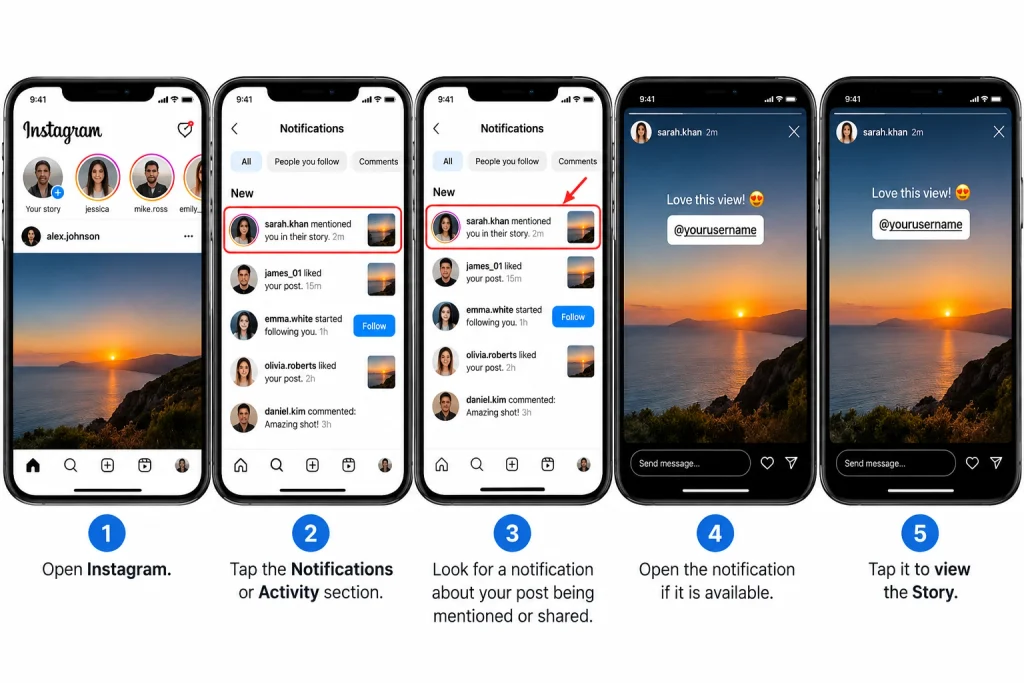
If you’ve been tagged in someone else’s Story on Instagram, you may receive a notification
Follow the steps below:
Open Instagram.
Tap the Notifications or Activity section.
Look for a notification about your post being mentioned or shared.
Open the notification if it is available.
Tap it to view the Story.
Please remember that Instagram Stories expire after a certain amount of time. It’s also important to remember that privacy settings might play an integral role in determining what you can see.
If the person doesn’t tag your account, then you are not going to be receiving any notifications. The same concept applies if someone has a private account.
Use Instagram Insights for More Information
Instagram Insights is a great way to get more information about your content without having to search for individual users.
Instagram’s Insights provides valuable information about your posts such as:
Likes
Comments
Saves
Reach
Accounts engaged
Profile activity
Follows from content
Specific metrics make it easier for you to understand how users interact with your posts.
For example, when there are high share counts, this means that the post is reaching people beyond your circle of contacts. High saves may mean that the content is considered useful and being kept for reference or future view.
What to Do If You Cannot Find the Share Number
If you do not have access to View insights, it is likely your account is not allowed to utilize the same professional tools that are available on other accounts.
Instagram’s features can change over time. Thus permanent buttons may have different locations depending on your app version, type, and device.
You can confirm whether you have access to professional features by checking your profile settings, where you will find Professional account, Insights, or Account type and tools options.
If you post frequently, you should switch your account to a professional one as it will allow you to view more performance data.
Why Instagram Does Not Show Every Person
The key reason for this limitation is an issue with privacy. People are able to privately share posts without making the action public through direct messages.
Let’s imagine that somebody sees your photograph and shares it with someone else. That person can do that without actually visiting your profile, so Instagram doesn’t have to disclose to you this interaction that happened privately.
This is also true for any other method of private sharing.
Thus, when you see that your post has been shared 100 times, you shouldn’t assume that Instagram will provide you with the identities of the 100 people who shared your post.
Can You See Who Shared a Post From a Personal Account?
While you might have access to certain sharing metrics, the reporting available to personal accounts is significantly limited.
If you mainly use Instagram to connect with your friends, this may not be a major concern. However, if you manage a page and share products or content with an audience, the Insights tool becomes very beneficial.
In this case, you can see how many users have shared your content, which can also be used for comparisons with likes, comments, or saves.
Please note that sharing options on Instagram may differ for different accounts. Because of this, certain features may not be available to the same extent across different profiles.
Be Careful With Apps That Promise a Full List
You may find websites or apps that claim to identify every single person who shared your post on Instagram.
Be careful with these services.
In reality, Instagram does not give users third-party access to its private list of those who have shared their posts on its platform. You are advised to be careful about any service that does so.
Never provide your Instagram password to an unknown service in order to see who has shared a post. Also avoid using tools that require you to download untrustworthy programs or enter any personal information.
Use Instagram features as far as possible.
The privacy of your account is as important as the statistics of your posts and if, for example, you want to learn about hide followers on Instagram, it is better to learn it directly from Instagram than using the services of an external provider.
Check Your Notifications Regularly
Keep an eye on your notifications regularly as they could sometimes show post-specific public actions that are not related to the general number of shares.
For example, if someone mentions you after posting a Story using your content, you might see a notification about this action.
Thus, make sure to monitor two areas:
Post Insights for the total number of shares.
Notifications for visible interactions involving your account.
When taken together, this will help you understand how viral your content has gone.
Final Thoughts
Normally, Instagram does not provide a comprehensive list showing everyone that shared your post privately. Still, it is possible to see the number of shares of the post when the Insights is enabled.
Users may also get insight on how people shared the post publicly by sharing the same on Stories and tagging you.
Do remember that share counts and names of people who have shared are not the same. Instagram provides relevant information regarding engagement on your post without revealing who has shared the post privately.
If you want to use Instagram like an expert, checking View Insights is a simple way to understand how people are interacting with your posts.
HowFixer is your trusted source for tech solutions. We provide easy "how-to" guides for gadgets, tools, apps, social media, and everything tech-related. Simple fixes. Smart tech. All in one place.