Instagram does not usually notify anyone when you take a screenshot of something on their account, such as any of the posts, stories, Reels, profile, or direct messages; however, there is one important exception: Instagram can notify the sender if you take a screenshot of a disappearing image or video sent through chat.
The reason for this confusion is that there have been a number of changes to Instagram’s screenshot policy over the years. So if you want to know if someone will know when you’ve taken a screenshot of their post, keep reading to determine if it matters based on what you screenshot.
In this article, you will learn exactly when Instagram will alert you about a screenshot and when it won’t, as well as the important considerations you need to keep in mind before taking one.
Table of Contents
Does Instagram Notify When You Screenshot a Story?
No, Instagram will not let people know that you have taken a screenshot of their Story.
If you watched a friend’s Story and took a screenshot, the account will not be notified that the screenshot was taken.
This means that you can take screenshots of Stories, including:
Story Photos
Story Videos
Text Stories
Story Photos with stickers or music
Stories from public and private accounts that you can see
Therefore, you can take a screenshot of the Story without the account knowing.
Instagram has tested screenshot notifications for Stories in the past; however, it is not a standard feature at present.
Does Instagram Notify When You Screenshot a Post?
Instagram does not notify users if you take a screenshot of a regular post. This includes photos and other regular content in your Instagram feed. This is true for both public and private accounts as long as you have permission to see their post.
Therefore, if there is a photo that you would like to remember later, you are free to take it by screenshotting and the person posting will usually not have any idea that it has been done.
It is important to note that taking a screenshot is not the same as saving the post in Instagram. When you save a post using Instagram’s save feature, it ends up in your saved post section. If you save something, the poster is not notified that you have saved their post.
Does Instagram Notify When You Screenshot a Reel?
Instagram does not send notifications when a person takes a screenshot of a reel.
Essentially, one can take a screenshot and the reel creator will not receive a notification. The same goes for regular reel content too.
Still, it is worth remembering that a screenshot only captures what is visible on your screen. If the information changes later, your screenshot will not update.
If one wants to save a reel for future use, then saving it on Instagram will help better in this regard.
Does Instagram Notify When You Screenshot a Profile?
No. Instagram does not inform the user when you take screenshot of their profile.
You can capture screenshot of:
Profile picture
Profile page
Bio information
Public posts available on the profile
Other public profile information
Usually, account owner does not get notified about screenshot.
Does Instagram Notify When You Screenshot a DM?
This depends on the type of message.
Taking a screenshot of a regular Instagram DM will typically not alert the other person. Standard text messages as well as regular media sent in a chat generally do not alert the other person.
However, disappearing media is different.
Instagram will alert the sender if you take a screenshot of a disappearing photo or video sent via a direct message. These types of messages are meant to be viewed for a limited time and under certain viewing conditions.
So, before taking a screenshot in a private chat, check what type of media you are viewing.
Normal DMs
There is typically no notification send when the screenshot of a text message or other ordinary messages on Instagram.
Disappearing Photos and Videos
In the case of screen shots for disappearing images or videos, an Instagram notification may inform the person that the screen shot has been taken.
This is the main situation where Instagram’s screenshot notification feature matters.
What Happens When You Screenshot Disappearing Media?
Disappearing media sent using Instagram Direct will be treated differently compared to regular photos or videos.
If you take a screenshot of disappearing media, Instagram has the ability to show a warning in the conversation notifying that the screenshot was taken.
The type of warning that will be issued depends on the type of message being transmitted along with the current capabilities of Instagram.
Can You Screenshot Instagram Without Someone Knowing?
For most regular Instagram content, yes.
You are able to take screenshots of regular Stories, posts, Reels, profiles and direct messages without Instagram sending a screenshot alert to the user.
However, this should not be seen as an absolute rule since Instagram may alter their policies on certain features.
Because of these considerations, you should pay attention to the type of content you are taking screenshots of.
If you frequently use Instagram to save content, you could instead use the built in features of the platform. For example, the Save option allows you to save posts to refer to later instead of taking a screenshot.
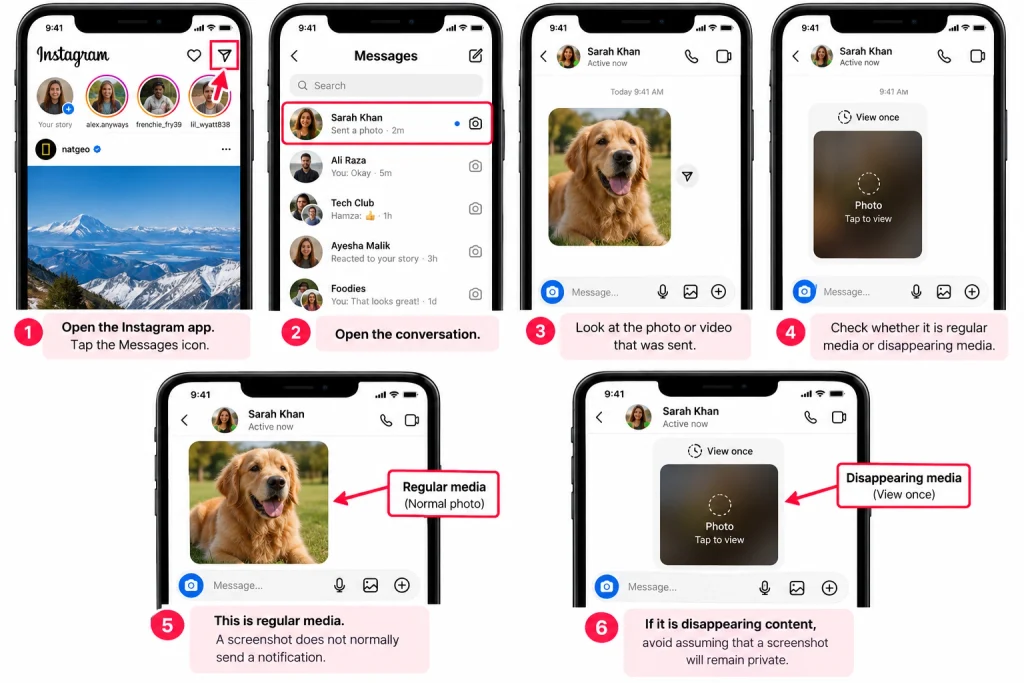
How to Check What Type of Instagram Message You Received
Before taking a screenshot, check to see what type of message the person sent you in chat first.
To check the message, proceed as follows:
Open the Instagram app.
Tap the Messages icon.
Open the conversation.
Look at the photo or video that was sent.
Check whether it is regular media or disappearing media.
If you find out it is a disappearing media file, do not assume your screenshot will not be seen.
This relatively quick step to verify will allow you to know how to approach making your screenshot.
If you want to know more about using Instagram more securely, you should learn about the differences between regular posts, stories, reels, and disappearing messages so you can understand which behaviors each section has.
Does Instagram Notify When You Screen Record?
The functionality of screen recording is separate from that of a normal screen shot.
In most cases, Instagram does not send out notifications if a user decides to screen record an ordinary post or profile, be it a photo, story, or reel.
However, when it comes to disappearing media in direct messages, there is an exception to this rule. Instagram has forms of privacy units that perform a different operation when it comes to disappearing media, so these rules may be subjected to change when there are changes in the application.
This is to mean that you should not take it for granted that screen recording will always be undetectable.
What About Private Instagram Accounts?
Having a private account will not automatically mean that you do not get notifications when someone takes a screenshot of your Story or post.
When you follow a private account and are able to see their Story or content, a screenshot of that piece of content will not usually send the private account owner a screenshot notification.
But privacy is still important.
Even if a private account keeps people out depending on your privacy settings, that doesn’t stop someone who has access to your account from taking a screenshot of the content. So it is still important to limit how much personal information you share with others.
If you want to hide followers or make your account more private, Instagram offers several privacy and audience controls. These settings can reduce who can see your content, although they cannot guarantee that visible content will never be copied.
Final Thoughts
So, does Instagram notify when you screenshot?
In most cases, no. Instagram does not notify users when a Story, post, Reel, profile, or DM is captured via screenshot.
However, it is important to note that the exception to this rule relates to disappearing media in Instagram Direct messaging. These messages are equipped with extra privacy features. Therefore, taking a screenshot may notify other users.
Because Instagram constantly implements new features, screenshot rules may change. Do not take for granted that every screenshot you take will be private.
It is always a good idea to know what you are about to screenshot before actually doing so.
HowFixer is your trusted source for tech solutions. We provide easy "how-to" guides for gadgets, tools, apps, social media, and everything tech-related. Simple fixes. Smart tech. All in one place.