Instagram is a social media platform designed for sharing photos, videos, stories, reels, and messages. You can use Instagram for connecting with your friends, finding fresh content, following different brands, advertising your own business, or simply watching some short videos and enjoying. If you are a beginner, you can find lots of buttons and options to use on this app seems to be confusing. However, nothing is difficult at all.
This guide describes the process of using Instagram from the very beginning and become an expert.
Table of Contents
Create an Instagram Account
Setting up an account is the first step and you can do this using Instagram app on either Android or iPhone. You can also do it through web browser.
Let’s start:
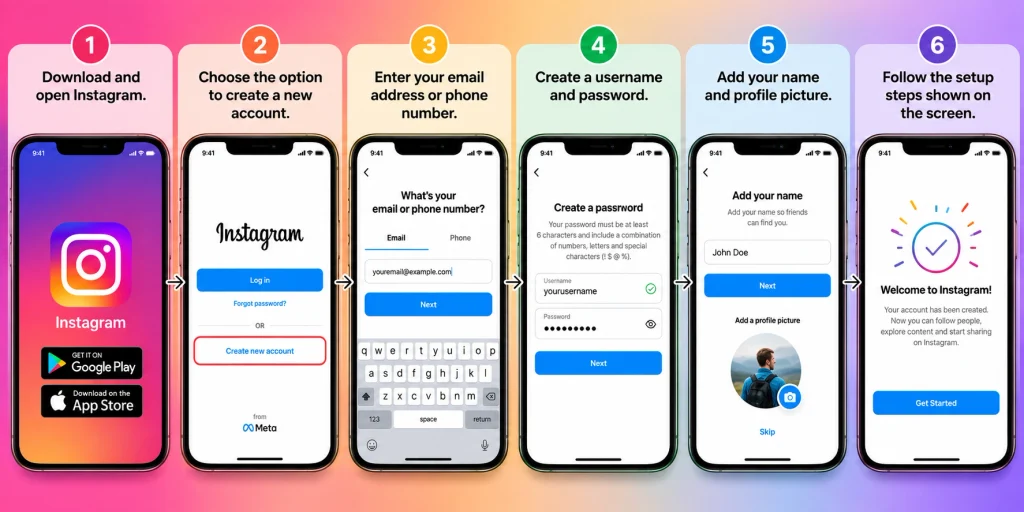
Download and launch Instagram app
Select create account option
Provide your phone number or email address
Create your user ID and password
Enter your name and set up profile picture
Follow the instructions on the screen.
Make sure your user ID is something easy to remember since people will search for you through it.
You can change your username later but it is typically better to use one that you want to stick with.
Set Up Your Profile
Once you create your account, proceed to your profile. This is where you can add details about yourself.
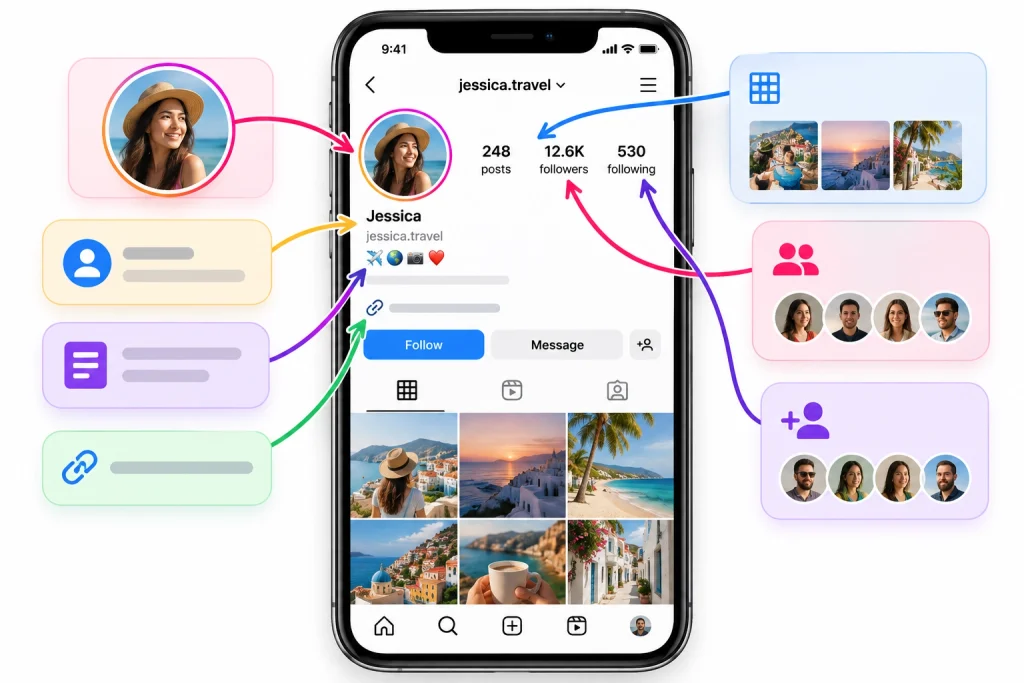
Typically, a profile will have the following contents:
Your profile picture
Your name
Your username
Your bio
Your website link
Your posts
Your followers
Your following
Your bio is a short space for you to present who you are or share something. You might say in this area that you love photography, travel, cooking, or technology.
Afterward, select an appropriate profile picture. If you are engaging in business on Instagram, you can use your business logo.
Learn the Instagram Home Page
The Home page shows posts and videos from accounts you follow. Depending on how much you use Instagram, what shows up in your feed may vary because of your usage.
When you scroll through your feed, you will see photos, videos, reels, and posts.
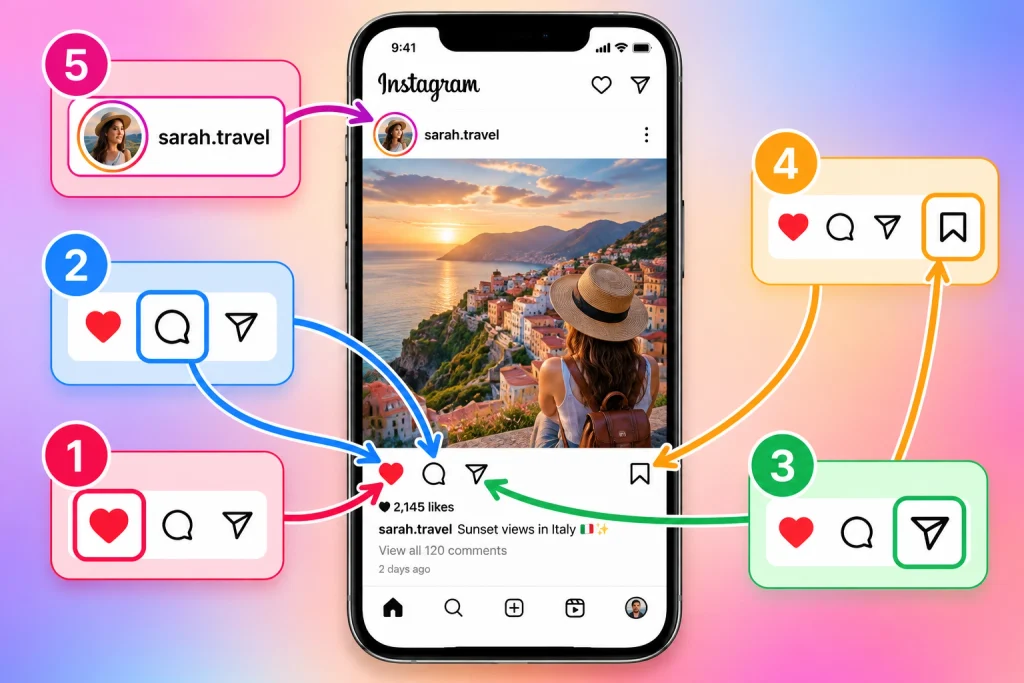
You have the ability to engage with the post in various ways:
By clicking (tapping) on the heart to “like” it
By tapping on the comment button to leave a comment
By using the share button to share it with someone
By saving it for future reference
By tapping on the creator’s handle to get a glimpse of their profile.
People don’t have to interact with all the posts on their timeline, and thus, users can just scroll to see the next one.
Follow People and Accounts
A major part of personalizing Instagram is following the people you wish to see posts from.
This means you may give a follow to family and friends, celebrities, brands, sports teams, news sources, and more. This helps provide you with their public content throughout your feed.
Additionally, you may unfollow accounts at any time to ensure that only posts you want to see get to your feed.
You can use the search option on Instagram to find accounts by typing in a name/username or any other word associated with the account. This will show you possible accounts, posts, Reels, or related posts.
How to Post a Photo or Video
Posting is one of the important features of Instagram. You will be able to post either from your mobile phone or create content for Instagram.
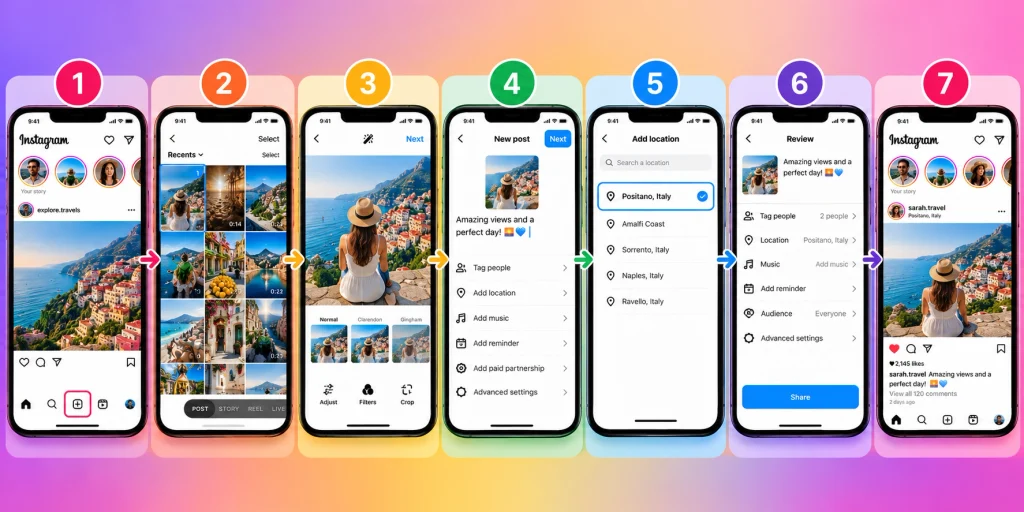
To create a post:
Press the button to create your post.
Select any desired image or video from your device.
Edit your picture/video as per your liking.
Enter a caption of your choice.
Add location or anything else if required.
Check your post.
Upload it.
Make sure your caption is understandable and matches the content. You are free to use the hashtag if they align with your content.
How to Use Instagram Stories
Instagram Stories provide the opportunity to share photo, video, text, or any other updates temporarily.
To make a Story, simply tap your profile picture or the Story creation icon, take your pictures or videos, or use any from your camera roll.
You can also put the following to your Stories:
Text
Music
Stickers
GIF
Questions
Polls
Location Information
Once you are done editing the Story, go ahead and share it with your audience.
Stories can come in handy if you want to share something quick and do not want it to be part of your regular feed. You may want to let everyone know what you’re up to today, present a new product, or post a short announcement.
How to Use Instagram Reels
Instagram reels are small videos that can be used for different purposes like entertainment, education, tutorials, and product showcase, etc.
To create reels, you have to use creation tools where you will select the option of reel. Then you can record videos or you can choose your pre-recorded videos.
With the tools available, you can add music, text, effects, etc.
Make sure you keep your video to one point and that your text is easy to read with a clear intention.
If you are watching Instagram reels, then just scroll through the videos and like, comment, or save the videos that you find useful.
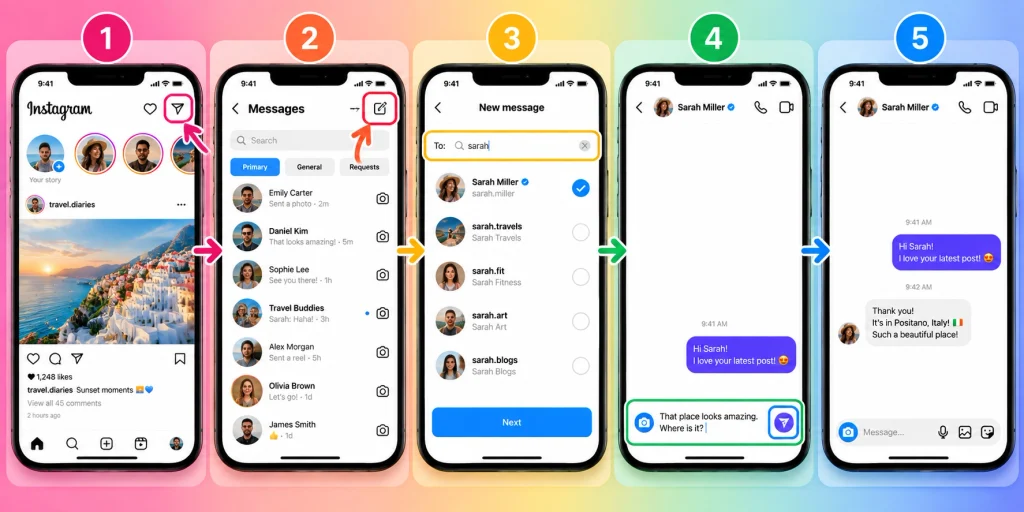
How to Send Instagram Messages
Instagram allows you to send messages also. It allows you to send private messages to other users.
To send a message to a user:
Go to Messages.
Initiate a new message.
Search for that user.
Compose your message.
Send it.
You can also send pictures, videos, posts, reels, voice messages, and different stuff through direct messages.
However, be careful when sending messages to non-friends. Do not send passwords, bank details, authentication codes and similar sensitive information.
How to Like, Comment, Share, and Save Content
Instagram offers you options to engage with content.
You can give a heart to show that you enjoy a post. There is also the option to leave a comment when responding to the post publicly. Using the share/repost option allows sending the content to another person or sharing with others via Instagram features.
The Save feature is handy whenever you want to come back to a post at a later time. For example, you might want to save a recipe or a travel itinerary.
Manage Your Instagram Privacy
Because privacy is an extremely important aspect of Instagram in new users.
Instagram has options to ensure that you can control who can see your content and how to connect with you. It is important to check this information soon after creating your profile
Control comments, messages, mentions, tags, and other engagement settings.
If you wish to have more control over your audience then you can create a ‘private’ page so all your follow requests can be screened before approval.
Do not forget to block or restrict any accounts that are creating issues.
Use the Search Feature
Using the search feature on Instagram can enable you to find new content out there.
You can look for:
People
Username
Keywords
Places
Keywords with hashtags
Content
If you love photography, do a search for photography. This will show you the accounts and the content you may be interested in.
When you start engaging more with posts, this will also impact your future recommendations.
Tips for Using Instagram Safely
Instagram can be fun to use but regardless users should be careful online.
Here are some basic safety tips to remember:
Choose a strong password that is different from all your other passwords.
Use all account safety features available.
Do not share your login details with anybody.
Be careful of suspicious links.
Do not send money to strangers on the internet.
Research people before trusting their communications.
Regularly check your privacy settings.
Report abusive content to Instagram.
Most importantly, be cautious not everything you see online is true. Always verify important information before sharing it.
How to Use Instagram for a Business
Instagram is a powerful tool that allows you to promote your business. In this regard, you can establish a professional Instagram account and utilize it to promote your products and services as well as keep your customers informed.
Having a business account will help you present your business identity in the best possible way. You can use the various types of posting features, such as the Instagram posts, Instagram Stories, and Instagram Reels to provide information about your business and attract potential customers.
For effective promotion on Instagram, you should provide useful information as opposed to just advertising. For instance, if yours is a clothing company, you can have posts about fashion tips, information about products, answers to consumers’ questions, and behind-the-scene content.
A good example can be taken from the restaurant industry which can have posts about menus, food and beverage preparation videos, and news about launches and openings among others.
In brief, the best way to promote your business is to offer customers something valuable.
Final Thoughts
Instagram is not complicated to use at all. Just create an account, find and follow people you like, and then use the app’s basic functions, which are posting, stories, and reels.
Be patient with the process and get used to using the app. It’s also essential to keep your profile private and safe. Choose one option to make your personal information discreet from outsiders.
HowFixer is your trusted source for tech solutions. We provide easy "how-to" guides for gadgets, tools, apps, social media, and everything tech-related. Simple fixes. Smart tech. All in one place.