If you want to find your SIM card number on Android, it is easy when you know where to check. You may be able to view it in the phone’s system settings, by dialing a certain number, or on the actual SIM card. The method you will use depends on your phone’s make and model, Android version, and mobile network.
Before you begin, keep in mind that SIM card numbers are not the same as phone numbers or IMEI numbers. The guide below will help you to locate your SIM card number without needing any additional apps.
Table of Contents
Method #1. Check SIM Card Details in Android Settings
The simplest way to locate the SIM card number is through the settings on your phone. A number of Android devices have information on SIM cards in their “About Phone” section.
Here’s how you can do it:
First, launch the Settings on your Android device.
After that, search for Various About or info or even SIM details present under the settings.
You should then select the appropriate option and check for ICCID or the serial number of the SIM card.
If you find the number, note it down precisely
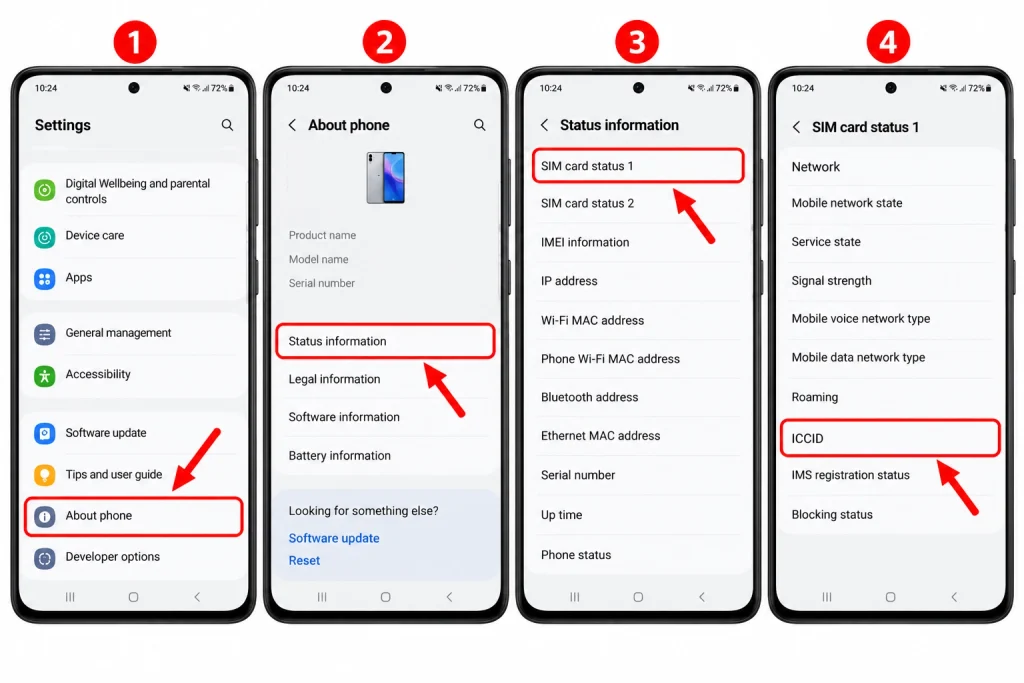
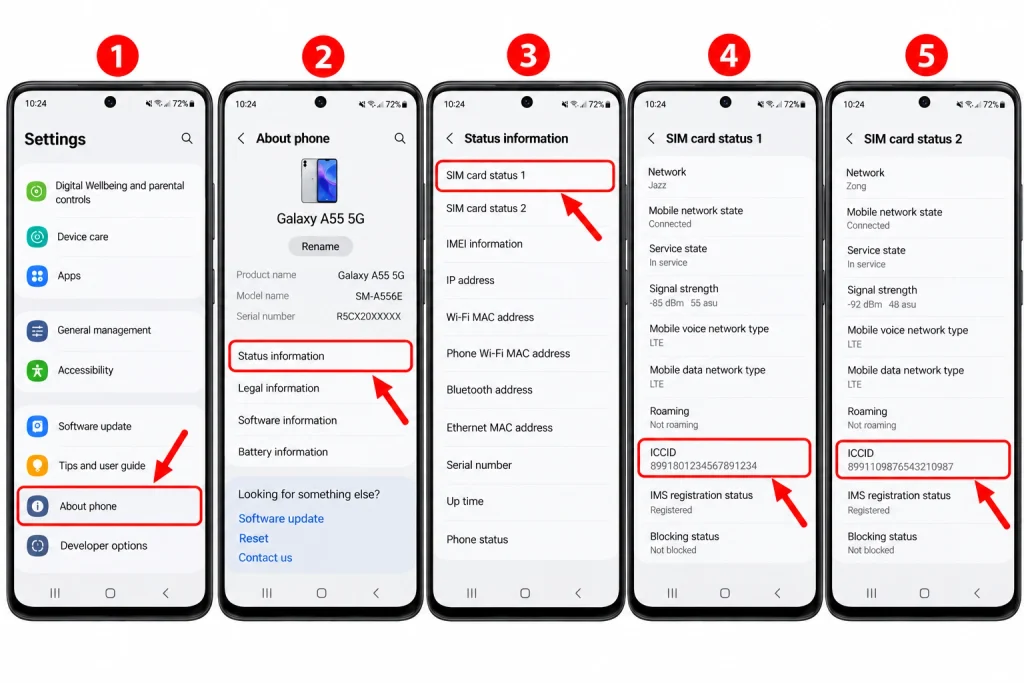
On Samsung Galaxy phones, you can check – Settings > About phone > Status information > SIM card status and you can note the ICCID field.
However, please remember that not every Android phone may not share the information about their serial numbers of the SIM card. If you cannot find it in the settings application, you can search for the next method.
Method #2. Use the *#06# Dial Code
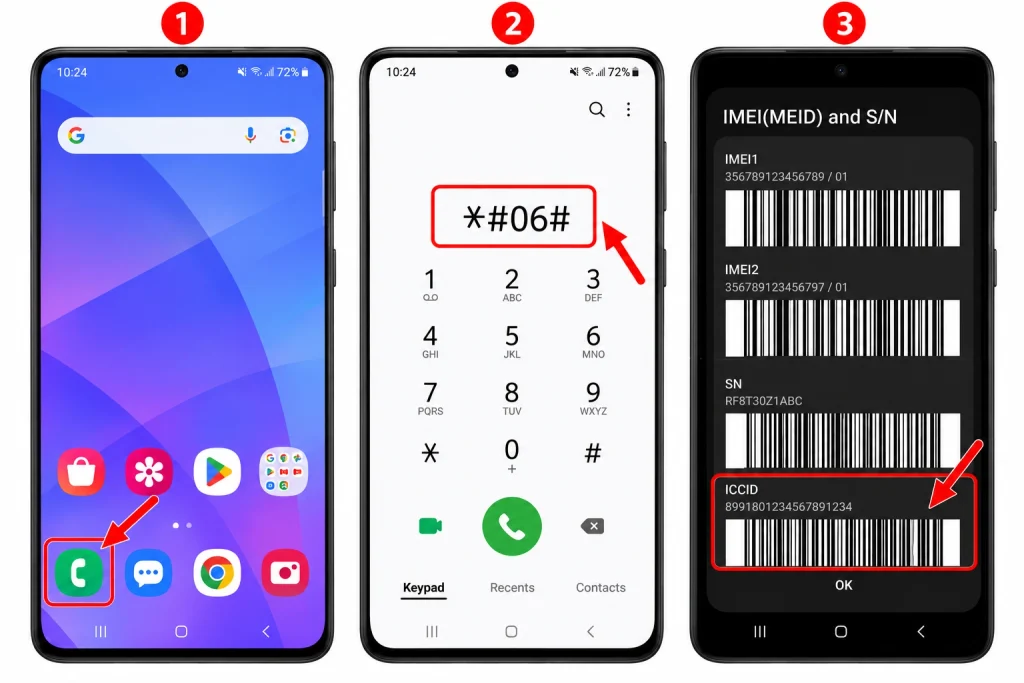
You might want to use the dialing code as your alternative option. Most Android smartphones are capable of using the code *#06# to get the device identification numbers.
You can do this as follows:
Open the dial pad.
Enter the code *#06#.
Wait until the screen comes up.
Now check if the screen displays ICCID or the SIM serial number.
There is no need to push the call button. Moreover, the information will appear on its own in approved devices.
It is worth noting that the results differ significantly; some devices will give you IMEI instead of the SIM serial number. Therefore don’t assume that any number presented on this screen is your SIM serial number. If there is no ICCID, you need to use the settings method or take a look at the physical SIM card.
Method #3. Check the Number Printed on Your SIM Card
If your device does not indicate the ICCID, you can opt to check the physical SIM card. The procedure will also work if the settings option does not provide the required information.
Use the following procedure:
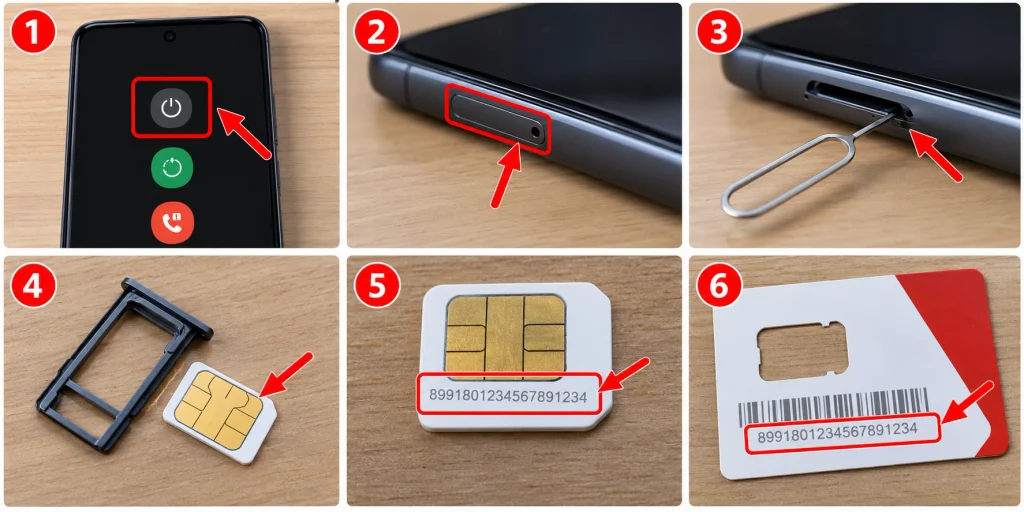
Switch your device off to minimize any interference.
Locate the specific part of your device where the SIM is located.
With the SIM ejector, you can remove the SIM card.
Once you have removed the SIM card, you need to look out for the small number or numbers printed on the card.
You should compare this number with any packaging that may contain the same.
The SIM number could be an extensive number. It could begin with 89 depending on your SIM as well as the country of issue.
Nevertheless, the number may be very small. You should ensure that you have enough light to read the information correctly. Remember not to force open the tray because you may damage the hardware.
Method #4. Find Your SIM Number on a Samsung Phone
Samsung Galaxy devices run on One UI which may make their settings look different when compared to other Android devices.
To check your SIM information, follow these steps:
Launch Settings.
Tap About phone.
Select Status information.
Click on SIM card status.
Search for ICCID if there is any.
If you possess two SIM cards, then check the information for the desired one. Certain models of the Samsung also come with an option for SIM management located at Settings > Connections > SIM manager.
That being said, not every model has ICCID which renders it unable to be sought after. Hence, if you are unable to track it down using the steps above, you can simply use the search bar in Settings to input the words “SIM card status.” Alternatively, you could always look up your physical SIM or give a call to your mobile carrier.
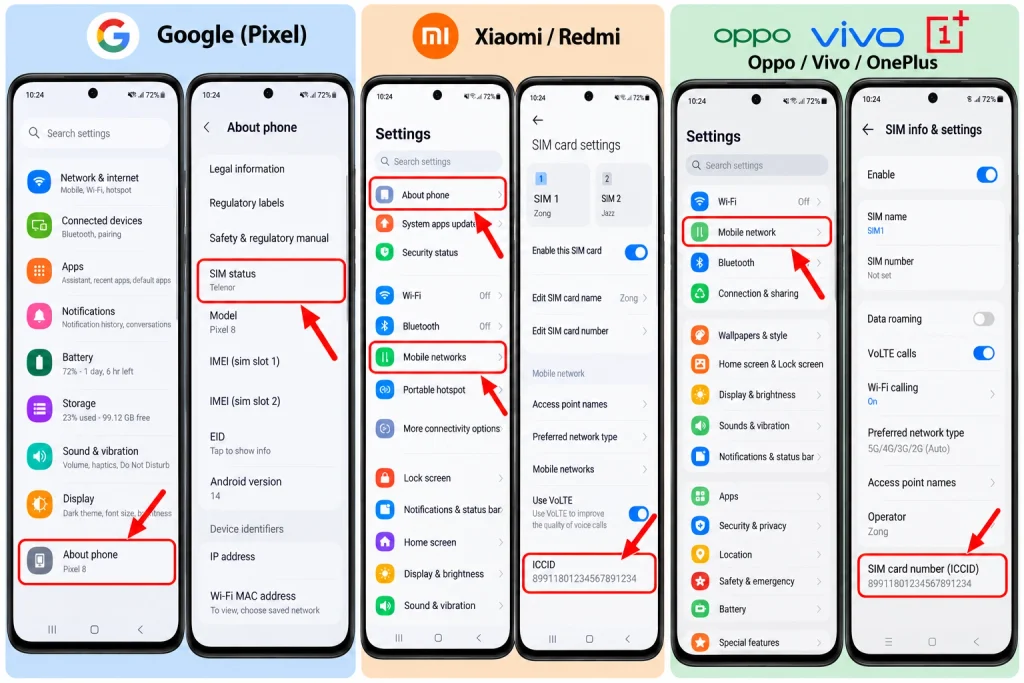
Method #5. Find the SIM Number on Other Android Phones
Devices manufactured by Google, Xiaomi, Redmi, Oppo, Vivo, OnePlus, etc., have different menus for settings.
Nevertheless, the same method works best for the most time.
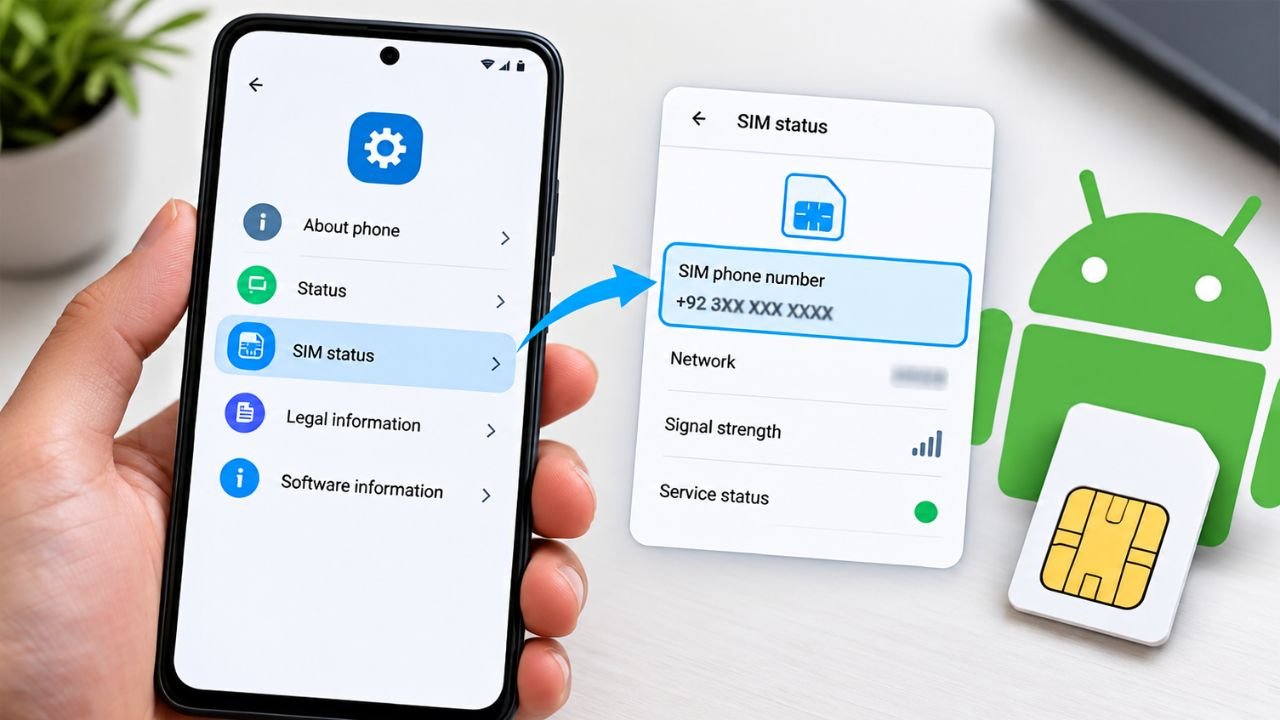
First of all, go the settings window and search “SIM status,” “SIM information,” or “ICCID,” etc. The best place to check for it would be in the section for About phone or SIM management.
If you’re using a phone that uses eSIM, go to the mobile network category/settings or SIM manager settings and choose the right profile for your eSIM. You may find the ICCID in the profile information.
If the number is not listed, then you might need to go to your service provider, because many Android phone settings do not show the full serial number of your SIM.
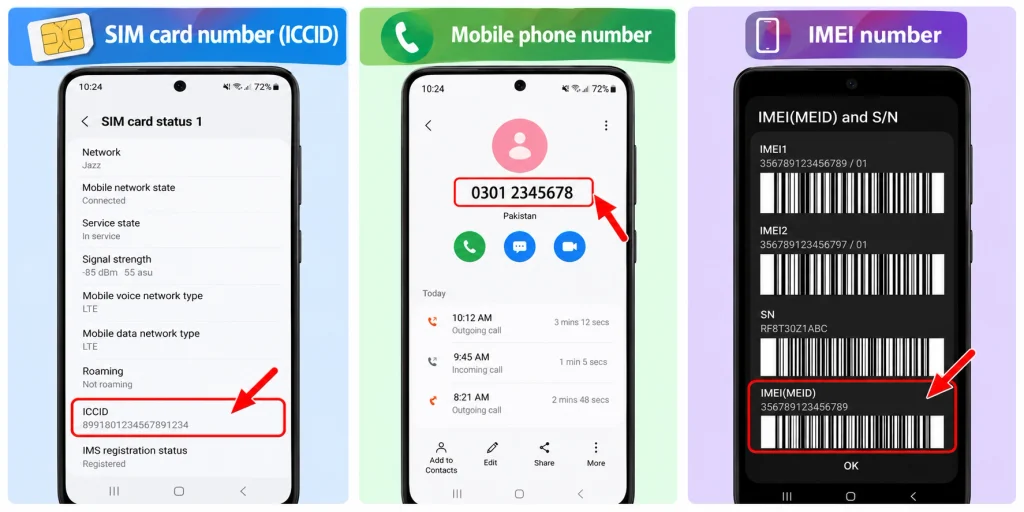
Understand the Difference Between SIM Number, Phone Number, and IMEI
Before you write down any numbers, ensure you are writing the right one.
SIM card number (ICCID): Is a piece of information that is a unique number that helps in identifying a SIM card or eSIM profile.
Mobile number: Is the number that other persons will call you with when they want to reach you.
IMEI number: A number used to identify a mobile device or a cellular hardware.
These numbers are for different purposes. For instance, your network service provider may ask you to provide your ICCID when you want to activate a SIM card or are checking your account. However, if your network service provider requests your IMEI, you must provide the device identifier of the mobile phone.
If you do not know which number to provide the provider, always check with them, before you disclose your information.
What to Do If You Cannot Find Your SIM Number
If the ICCID does not show up in your Android settings, that does not necessarily mean your SIM is defective.
Consider doing some of the following:
Restart your phone—this may help if the SIM information is not being loaded correctly.
Check the SIM packaging—the original packaging of the card may have the serial number written on it.
Ask your network provider—they may be able to identify the ICCID associated with your SIM.
Look up eSIM information—if you have an eSIM, check the SIM management features on your phone.
Do not download any unverified app—there should be no need for downloading unverified apps just to retrieve a SIM serial number.
You should also keep your ICCID confidential and preferably only give it out to your mobile operator or a trusted third-party service, which has a legitimate reason for requesting the information.
Final Thoughts
As an Android user, you can find the SIM card number on your device either through settings, dialing *#06#, or checking the physical card. On Samsung devices, you can go to the SIM card status that can provide you with the information. Other devices may show different settings.
If the above methods did not work, try reaching out to your mobile carrier for help. Just ensure that you are looking for the ICCID rather than the mobile number or IMEI.
HowFixer is your trusted source for tech solutions. We provide easy "how-to" guides for gadgets, tools, apps, social media, and everything tech-related. Simple fixes. Smart tech. All in one place.