The Wayback Machine is not a trusted method of archiving posts, profiles, or stories on Instagram as it does with other web pages. Though the Internet Archive may contain some old Instagram pages and public posts, many Instagram pages will have broken links, missing images, or have no saved version at all.
If you’d like to find an old Instagram page or post, the Wayback Machine is still an option, although it is very important to keep in mind its limitations.
In this article, you will learn how the Wayback Machine archives content, why certain pages are not archived, and how to look for older content on Instagram.
Table of Contents
What Is the Wayback Machine?
The Wayback Machine is a service provided by the Internet Archive. This service provides snapshots of web pages at different periods of time.
For example, the look of a website may not be similar to its version five years ago. If that web page has been archived, you may be able to open a previous state of the website on the Wayback Machine.
However, it is important to note that the Wayback Machine does not keep copies of every web page on the internet. Consequently, every part of the archived web page does not mean that all of its features will work.
This is especially true when checking archives of social media websites such as Instagram.
Does the Wayback Machine Archive Instagram?
Yes, the Wayback Machine archives Instagram accounts, however, its archival coverage for Instagram accounts is quite minimal.
A public Instagram account may be exist in the archive only if the Internet Archive captured the particular Instagram page. Once it is archived however the archived Instagram page will not function like an active Instagram page.
For example, you might see:
An old Instagram profile page
A saved public post URL
Old page text
A profile name or description
A partial version of an Instagram page
On the other hand, photos and other interactive features may not load.
Hence, if you find a public Instagram page on the Wayback Machine, it does not mean that the Instagram page was archived completely.
Why Does Instagram Content Often Not Work?
Instagram is a constantly changing platform. A lot of its information is given through scripts and other kinds of technology rather than being shown simply as a regular web page.
Because of that, archiving information from Instagram can be hard to do.
On a regular website, text and images are on the web page, meaning they can be archived without problem. Instagram can either send the information after the web page loads or get info through another request for the posts, comments, and images.
This means that when trying to archive an Instagram page, you may only probably get partial content.
In addition, there is one more issue. Instagram keeps changing how their pages are set up. Old archives may look for information or work with content that is gone already.
Because of this, when you find an archive of an Instagram page, it is probably going to be incomplete.
How to Check Instagram on the Wayback Machine
You can easily find out whether an Instagram URL has archived.
Step 1. Find the Instagram URL
First, determine which Instagram account or post you want to verify.
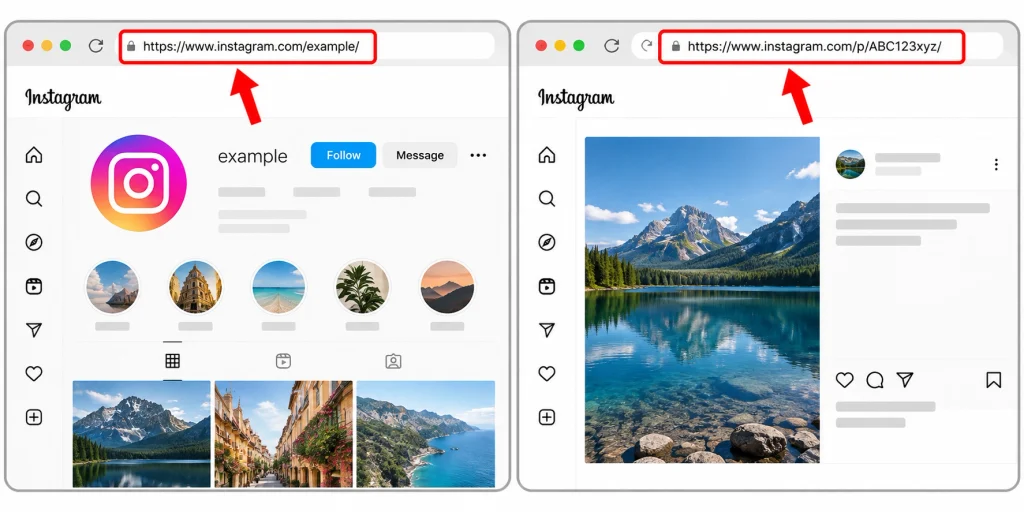
For an account, the URL will look something like this:
https://www.instagram.com/example
For a public post on Instagram, the URL will contain the format /p/ or other Instagram patterns.
Use the original URL if possible. Even a slight difference in name can yield different archive results.
Step 2. Open the Wayback Machine
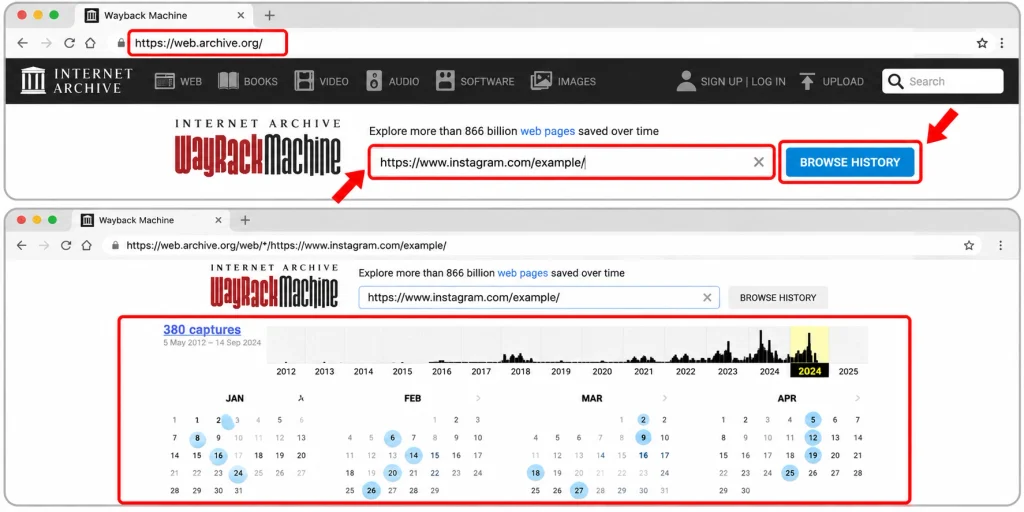
Visit Wayback Machine’s web page.
Provide the Instagram URL into the search area. Then begin your search.
When the website has been archived, you can see a timeline and calendar indicating available captures.
Step 3. Choose an Older Date
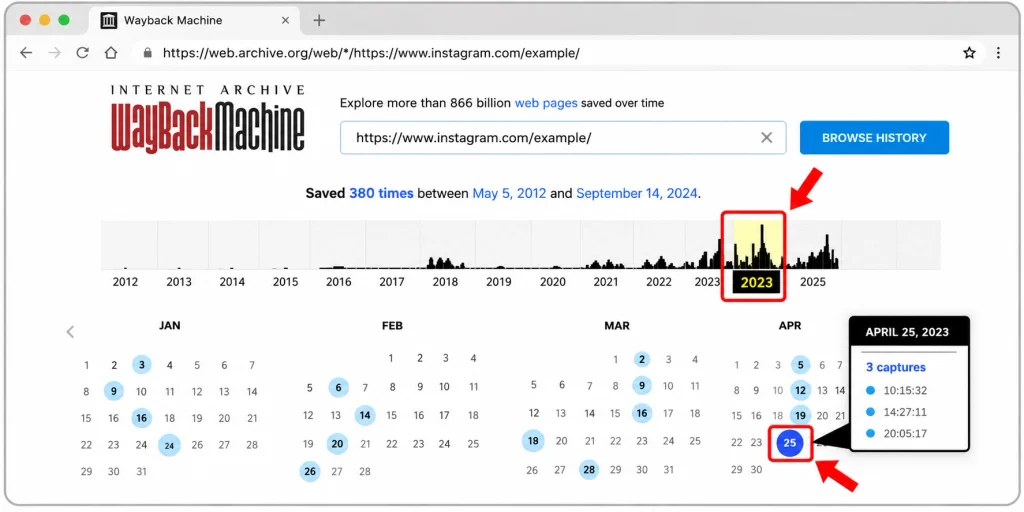
If snapshots are present, you can choose a year from the timeline.
You can then select a date using the calendar having saved captures. You can use a date close to the range you are interested.
Lastly, you will get the archived page.
Step 4. Check What Was Saved
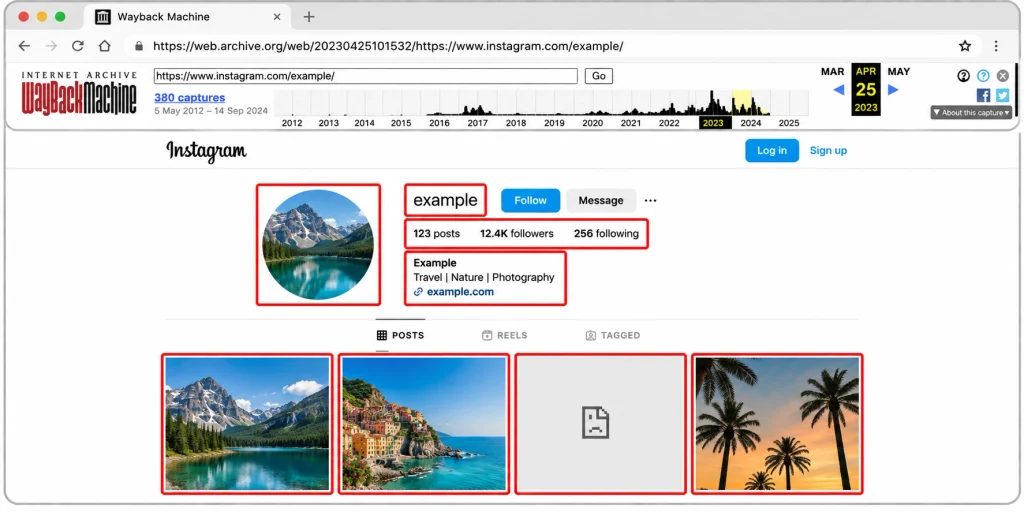
Do not assume that everything from the original Instagram page was saved.
Look at the profile information, links, images, and other visible text on the page. Some information may still work, while other information may not be saved at all.
If you can’t get an image, try using a different date for capture. Different capture dates sometimes yield more information.
Can You View Deleted Instagram Posts With Wayback Machine?
Sometimes, but there is no guarantee.
The most important thing is that the Wayback Machine has previous saved pages of the Instagram page before the deletion or adjustment of the Instagram posts.
In cases where a past copy does not exist, the Wayback Machine will not be able to recreate a deleted post.
For instance, if the user had a public page with a post that was deleted in 2024 and the Wayback Machine saved it in 2022, the user can revisit that page through the hyperlink.
However, if there was never a copy made of it from the Wayback Machine, the user can search for it in vain.
Besides, if there is an archive link of that post shown in the Wayback Machine, it does not mean that the link will contain the original picture and video.
Can Wayback Machine Save Instagram Stories?
Searching for Instagram Stories via the Wayback Machine is more difficult than before.
Stories are meant to be temporary. They usually go away after a day unless the user saves them in their story
It should be noted that since Instagram Stories are short-lived, the Wayback Machine might not be able to provide you with information regarding an entire history of previously published Stories.
If you are looking for a certain story, you might want to do an archive search; however, it is still possible that you may not have access to a working version.
Can You See Old Instagram Photos?
You might have access to an old Instagram photo if the photo has been archived well.
However, several things can affect the result.
The photo has to be captured and archived. Next, the archive website has to have the archived copies of the photo too. And lastly, the old links utilized by the archive have to point to an available archived file.
Thus, you can access an old Instagram post but find a blank spot where the photo ought to be.
You can search using a different archive date. Instead of searching the profile only, you may be able to search the entire URL of the Instagram post.
Final Answer: Does Wayback Machine Work on Instagram?
Yes, the Wayback Machine can work with some Instagram URLs, but its coverage is limited. There may be archived content for an account, for instance, some public posts
The best way to go about this is really simple just start with the exact account URL and then check what snapshots are available try several different timeframes if a particular attempt returns results without all the posts there may well be other attempts that yield different but equally interesting snapshots.
Most importantly allow yourself to keep in mind that the Wayback Machine cannot restore anything not previously archived as it has no means of recreating un-captured Instagram content.
HowFixer is your trusted source for tech solutions. We provide easy "how-to" guides for gadgets, tools, apps, social media, and everything tech-related. Simple fixes. Smart tech. All in one place.