You can message friends and family in other countries using iMessage without international text messaging fees. You just need to have an Apple device and keep your iMessage account running over Wi-Fi or mobile network.
There’s one key rule: iMessage is free over Wi-Fi, but you may get charged for using cell service. If the iMessage message gets sent as a regular SMS-type message, your mobile carrier may charge you regardless of your iMessage subscription.
This article explains how to set iMessage up, send messages for free internationally, and avoid unexpected fees.
Table of Contents
What Is iMessage?
iMessage is a messaging application developed by Apple and is integrated into the Messages application on iPhone, iPad, and Mac. It allows Apple users to communicate via the internet rather than conventional text messages.
As an example, a message from UK can be sent to someone in America (USA) free of international SMS charges if it uses the iMessage application and the internet connection.
Here are some important things to note regarding this service:
- Blue bubble: This indicates that the message is being sent via iMessage.
- Green bubble: This means that the message is being sent through other services like SMS, MMS, RCS, etc.
- Internet connection: iMessage requires internet connectivity in order to work.
- Apple device: The recipient of the message has to have iMessage available so that he/she can receive the messages in this format.
Hence always double-check the format of the message before sending in order to avoid any international message charges.
How to Set Up iMessage on Your iPhone
Before you can send messages abroad make sure to check whether or not iMessage has been set up properly on your device. The process is straightforward and takes a matter of minutes.
Follow the instructions below:
- Go to your iPhone Settings.
- Scroll down and tap on Apps.
- Choose Messages.
- Enable iMessage.
- Select Send & Receive.
- Choose your phone number or email address preference method of using iMessage.
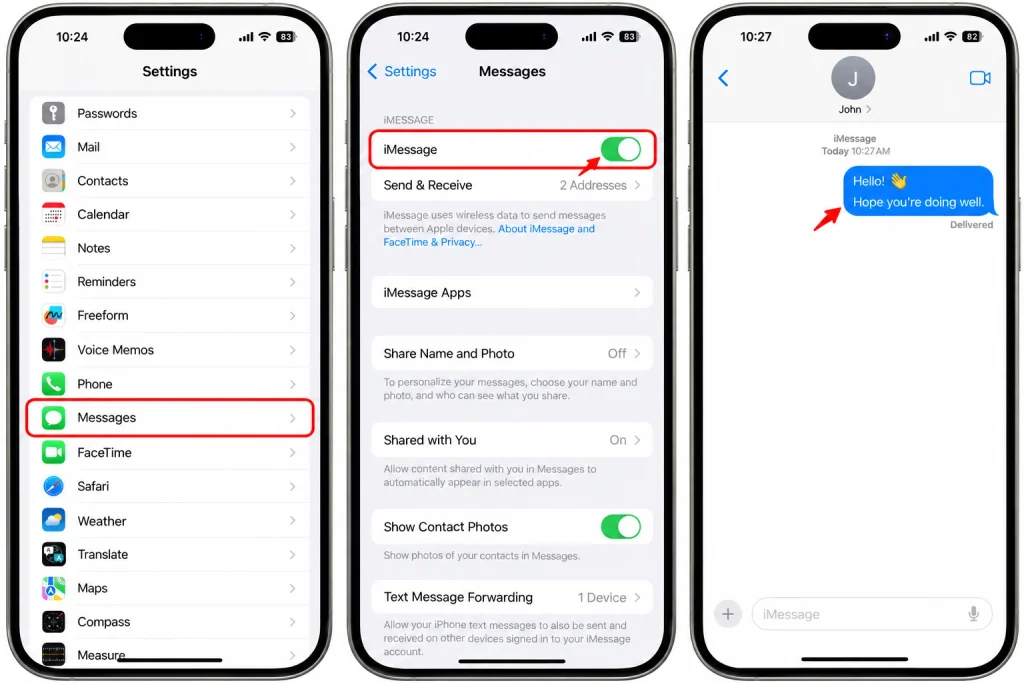
If prompted ensure that you are logged into your Apple Account. You should also confirm that your selected contact method is enabled under settings.
In case you do not have an activated phone number, please understand that it may take some time for Apple to verify it. Sometimes Apple sends out an SMS for verification purposes and your carrier may charge you for the SMS.
You can also use your Apple ID email address for iMessages. This option can be very helpful for sending messages over Wi-Fi without relying on your phone number to be able to message everyone.
How to Use iMessage Free Abroad
To use iMessage to talk to people around the world, first ensure that iMessage is on in your iPhone settings. There is no special international messaging package needed.
- Connect your iPhone to a Wi-Fi network or mobile internet.
- Next, open the Messages app.
- Tap on the new message button.
- Key in your friend’s telephone number or Apple Account email address.
- Make sure your contact has iMessage as well.
- Type your message and send it!
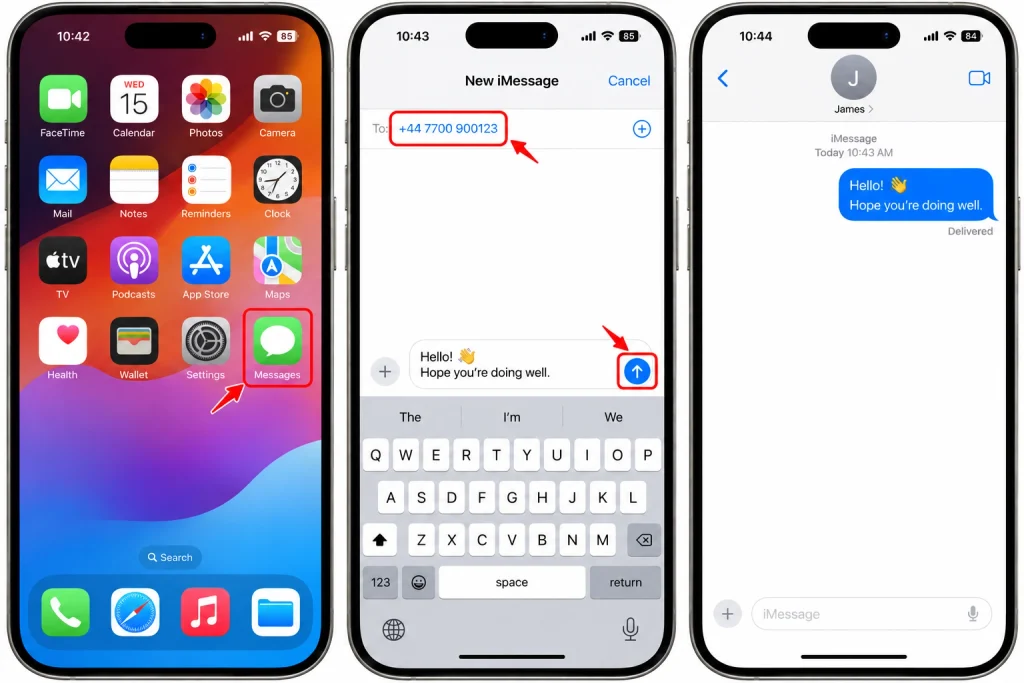
If your message is in a blue bubble, then you are successfully using iMessage!
For instance, if you are in Pakistan and your friend is in England, you are able to chat via iMessage as long as you are on a Wi-Fi connection.
However, make sure that your friend is connected to the Internet as well. If either one of you lose your Internet connection, the message will not go through.
How to Avoid International Messaging Charges
You should always check your settings when using iMessage so as to avoid unnecessary charges.
- Use Wi-Fi whenever possible. This helps you avoid mobile data charges from your carrier.
- Check the bubble color. Blue usually indicates iMessage, while green indicates SMS, MMS, or RCS.
- Be careful with SMS fallback. Your iPhone may try to send a message as SMS when iMessage is unavailable.
- Check your mobile plan. Data roaming can be expensive when you travel abroad.
- Use an email address if needed. You can select your Apple Account email under Send & Receive to use it for iMessage.
Make sure that you check the Messages settings on your iPhone. To reduce the risk of having accidental SMS charges, you can prevent the Sending as Text Message option from being sent under Settings > Apps > Messages. Remember that the messages will not be sent if iMessages is not available.
When using Wi-Fi, it does not mean the normal SMS will be free. You must send the message through iMessage otherwise you will be charged for sending an international SMS.
Can You Use iMessage Internationally Without a SIM Card?
Yes, it is possible to use iMessage as long as you are connected to Wi-Fi and you do not have a functioning SIM card. You can use your Apple Account email address to be contacted for iMessage, after you have configured both your Apple Account and your device.
For instance, you can use your iPad or any other Apple device to send and receive iMessages either directly, because it does not have a cellular SIM, or by being connected to Wi-Fi, if an account has been created for the iPhone.
However, to set up or initiate the use of iMessage with the phone number on the iPhone, you may have to perform an SMS verification. You may also need a SIM card or an eSIM and service provider for activating that mobile number. Thus, it is possible to use iMessage without a SIM card. But phone number activation is a different issue.
What to Do If iMessage Is Not Working
Below are some easy methods to try when sending or receiving international iMessages is not successful.
- First check your internet connectivity. Open a web page and make sure your Wi-Fi or the network data are working.
- Second check the iMessage settings on your device. Go to the settings and in the Apps menu, select Messages. Make sure there is a tick mark next to iMessage indicating that it is on.
- Thirdly please check your contact to make sure you entered the right mobile number or mail address.
If there still appears waiting for activation, you may wish to restart the device or allow time for activation as Apple indicated it may take as long as 24 hours for data/verification of the number. If the problem persists, please contact Apple support or the mobile service provider.
Final Thoughts
iMessage is an easy way to communicate internationally while avoiding paying for international SMS fees. All you need is an Apple device, iMessage account, and an internet connection.
For optimal performance, use Wi-Fi, ensure that messages show up in blue bubbles, and never send regular SMS messages to save money. You should also check your mobile data and roaming settings before you travel.
Following these rules will enable you to contact your friends, family, and coworkers from overseas without incurring exorbitant messaging fees.