One main thing should be clear: Instagram does not have a direct setting that allows you to hide your followers list from everyone while keeping your account public. We can use alternative methods to hide your followers.
If your goal is to keep your follower list away from certain people, these options can help. The steps are simple and can be done from the Instagram app.
Table of Contents
Method 1: Set Your Instagram Account to Private
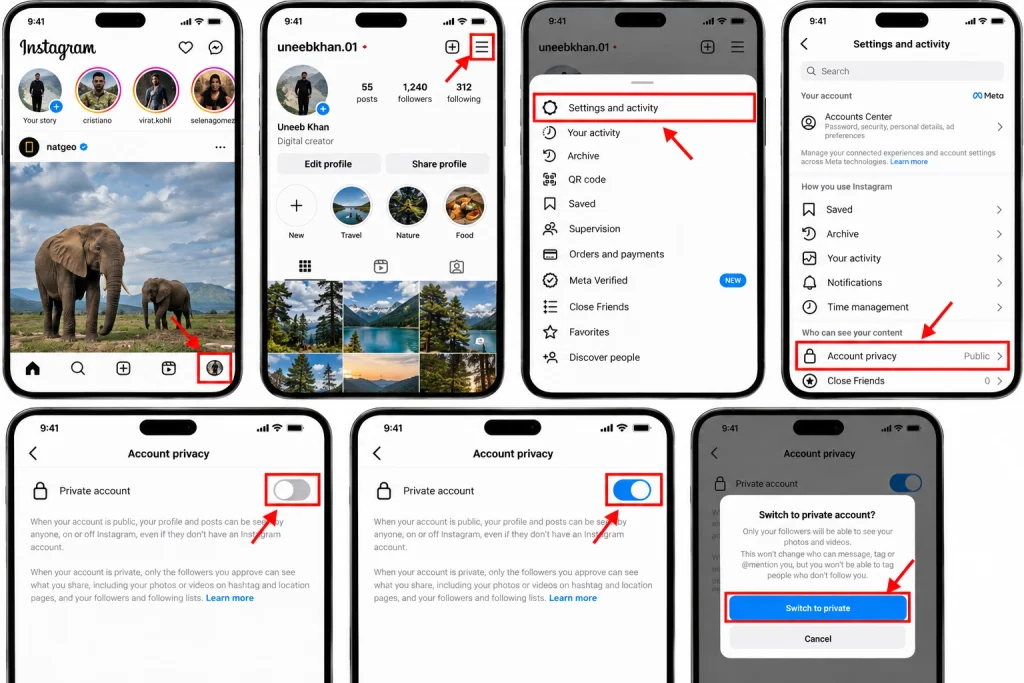
One of the easiest ways to control who can see your follower list is to hide your Instagram profile. Once you hide your profile, only followers whom you have approved will be able to view your followers and following lists.
To hide your account:
Open the Instagram app.
Tap your profile picture in the bottom-right corner.
Tap the three-line menu in the top-right corner.
Select Settings and activity.
Look for Account privacy.
Turn on Private account.
Confirm the change if Instagram asks.
After your account is made private, anyone who wants to follow you will need to send you a follow request, which you can either accept or reject as you see fit.
Keep in mind that followers whom you have already approved will still be able to see your current followers. As a result, if you wish to ensure that a particular follower is no longer able to view this information, you will need to remove or block them from following your account.
Method 2: Remove Someone From Your Followers
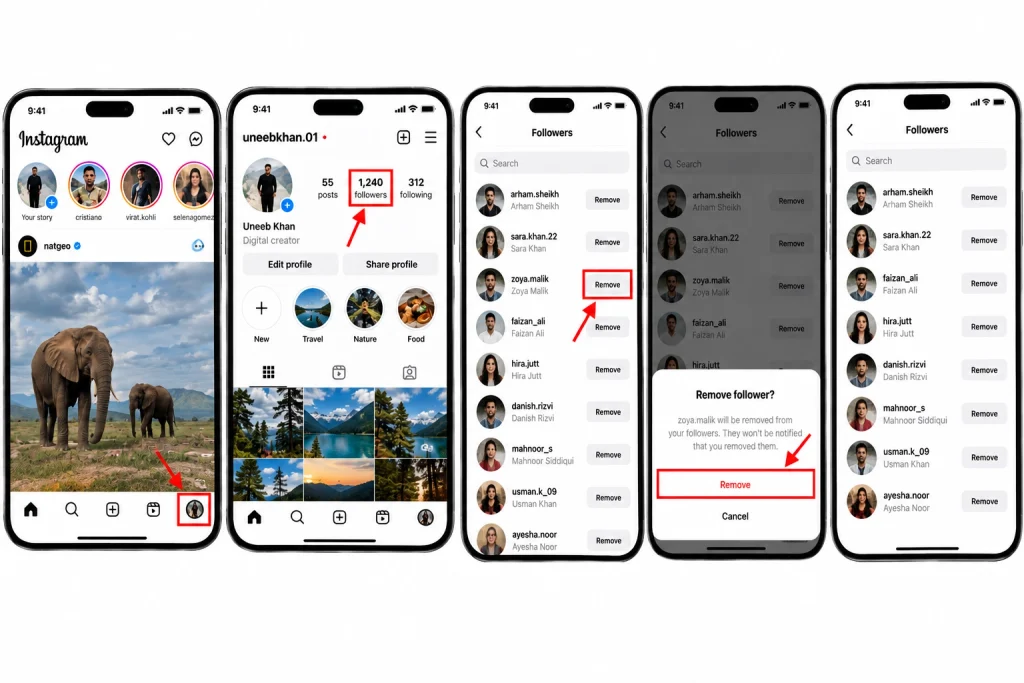
If you have a private Instagram profile, it is possible for you to remove someone from your followers without blocking them.
This can be beneficial if you want to keep your profile private but do not want an individual to be able to view it.
Follow these steps:
Open the Instagram app and go to your profile.
Click on Followers.
Find the individual you want to remove.
Click on Remove next to their name.
Accept the confirmation screen if needed.
Thus, without blocking or making changes to your account settings, you will have successfully eliminated the person from your followers list.
If, however, you have a public account, you will not be able to stop the individual from viewing your public account by removing them. In this event, you will have to block the individual or convert your account into a private reel.
Method 3: Block a Person From Seeing Your Followers
Blocking is one way to keep someone from having access to your Instagram account altogether.
When you block, that person is not able to access your profile or see your posts and followers.
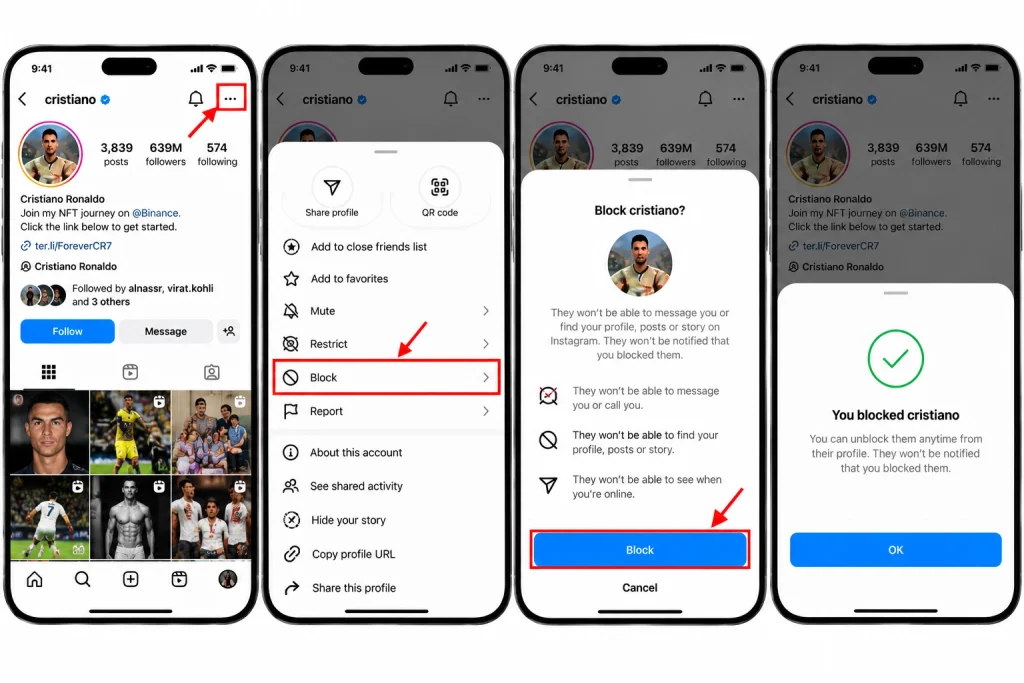
To block someone:
Go to their profile on Instagram
Click on the three dots at the top right corner
Choose the Block option
Follow the instructions that Instagram gives you.
This option is much stronger than removing a follower so use this option if you do not want that person to see or communicate with you on Instagram.
Can You Hide Your Followers From One Specific Person?
Instagram does not offer a simple option where you can choose to hide your followers from one specific user. There is no option for you to select just one follower and hide your entire list of followers from that specific person while still allowing them to follow you.
The only alternatives to hiding your followers from a single user are these:
A private account: limits who can view your profile to your approved followers.
Remove a follower: an option that removes a person from your private account.
Block: Prevents a person from accessing your profile.
Restrict: an option that limits interactions but does not allow you to hide the followers list of one specific person.
For this reason, if it is really just one specific individual you are concerned about, blocking them or removing them as a follower will generally be a more effective measure than other privacy features offered by Instagram.
What Happens When You Make Your Account Private?
When you switch your account to private, you limit access to your Instagram profile.
This means that all followers that you currently accepted will still be able to view your profile and content. New followers can send you a request to follow you.
On the one hand, it gives you more options and control over who can view your posts and information. On the other hand, a private account does not completely block access to your profile. Usernames, profile pictures, and some general information remain visible.
Finally, when you allow someone to follow you, that person becomes your follower. Therefore, review your follower list from time to time if you are concerned about privacy.
Why Instagram Does Not Have a Direct “Hide Followers” Option
While Instagram offers various privacy settings, it does not include a feature that allows users to fully hide their following lists for others.
With this in mind, Instagram has merged visibility and privacy issues, meaning that if you wish to manage who can see your following list, you need to change your profile’s visibility settings.
Thus, avoid using applications or websites that claim they can help you hide your Following list using an Instagram feature. You should not provide your Instagram password to any unknown service in order to obtain a privacy feature already denied by Instagram.
Final Thoughts
There is no option that allows you to hide your followers on Instagram but Instagram features various options to help you manage your privacy.
For general privacy, switch your account to private. If you already have someone in your followers’ list and you want to remove them from the list, remove the account from your followers list. In the event you want to prevent a certain account from having access to your account, blocking the account is the best option.
Most importantly, avoid third-party apps that promise hidden Instagram features. To manage your account privacy safely, use Instagram settings and built-in privacy tools whenever possible.
HowFixer is your trusted source for tech solutions. We provide easy "how-to" guides for gadgets, tools, apps, social media, and everything tech-related. Simple fixes. Smart tech. All in one place.