Purple Instagram DMs generally happen when a user sets a custom chat theme on a conversation. You can change the background, the colors of your messages, or overall style of the chat by applying a purple theme. To enable purple Instagram DMs, you can change the theme from within the chat settings.
The exact theme names and options may change as Instagram updates its app. However, the basic steps are simple.
Table of Contents
How to Get Purple Instagram DMs
Below are the few steps taken to change your Instagram chats to the color purple.
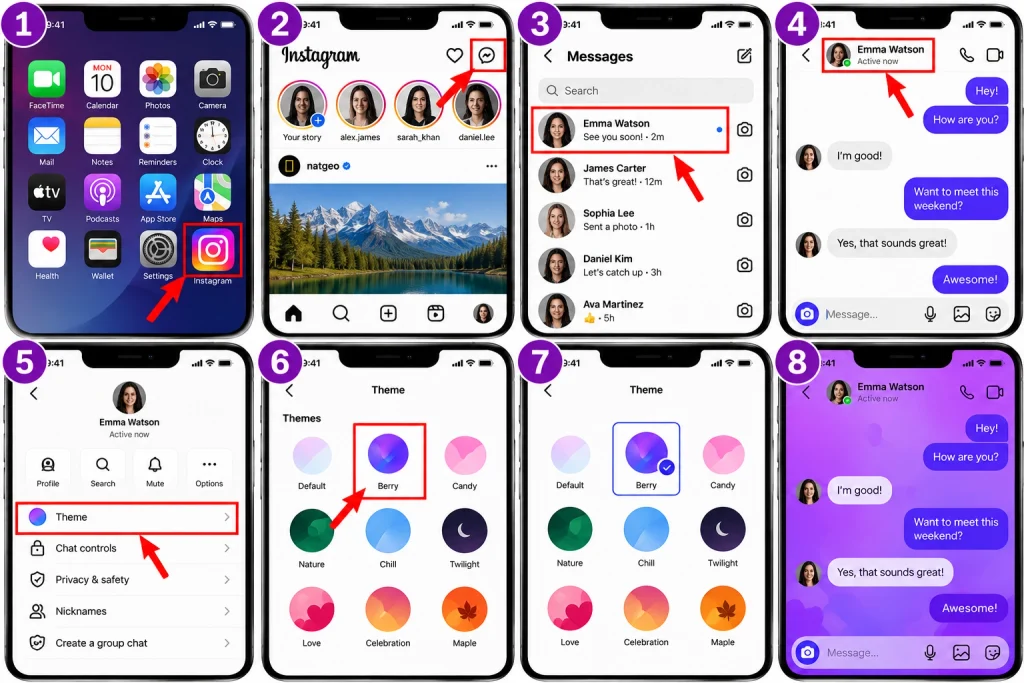
Click on the Message icon to gain access to your chat page.
Open the conversation that you want to change to purple.
Click on the name of the individual or the group at the top of your message.
Check for Theme or chat customization options.
Choose your favorite purple theme.
Return to your conversation page and the new look is available.
Note that the customization is only effective for the specific conversation and therefore any change for one conversation does not guarantee that every DM will be purple.
Check Your Instagram App First
If you cannot see the purple theme, first confirm that your Instagram app is updated. Instagram frequently makes changes to its user interface.
Check for the Instagram app in your mobile device’s app store. If there is an update, proceed to install it. Then open up Instagram and check to see if the chat settings are now available.
Additionally, it is worth noting that Instagram does not roll out new features to all of its users at the same time. As such, while one account may have access to the new theme, another account may still be waiting for the update.
Try These Steps If Purple Is Not Available
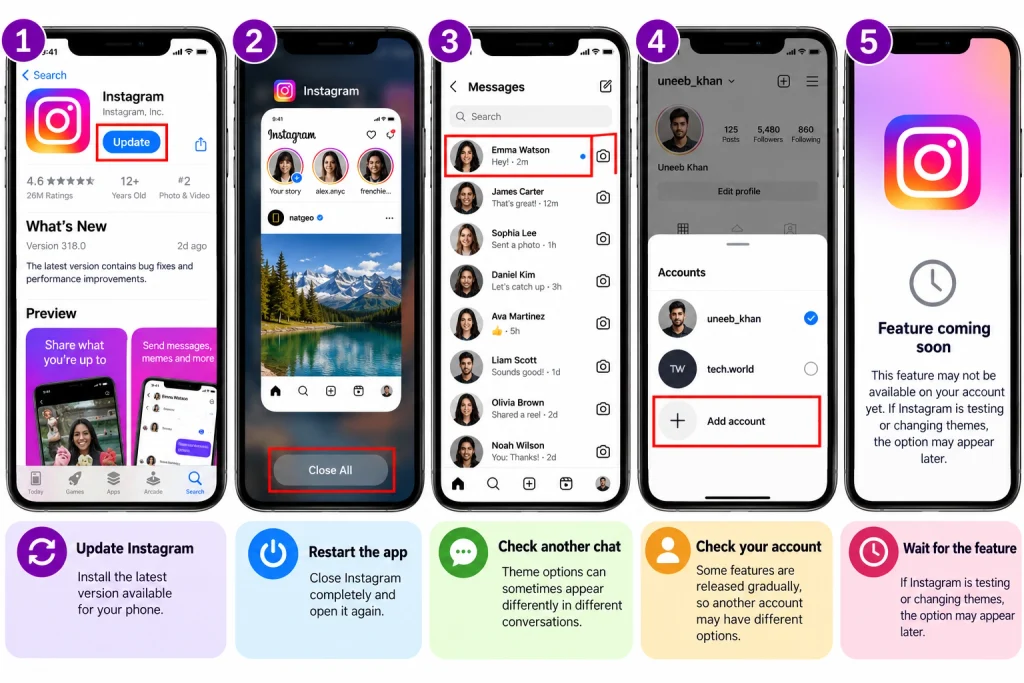
If you are not seeing any purple, here are a few quick checks to do:
Update Instagram: Make sure you have the latest version for your phone.
Restart the app: Close Instagram completely and restart the app again.
Look at another chat: Different conversations may show the theme options differently.
Check your account: Some changes are rolled out gradually, so your other account may feature a different user interface.
Wait: If Instagram is rolling out or testing updates, you may receive them eventually.
Do not attempt to download any unofficial Instagram application just to get the purple DM theme. These programs present account and privacy risks.
Does Purple Mean Something Special?
Purple DMs on Instagram usually do not indicate some special status of your account. The purple color usually appears as a result of your chosen chat theme for that conversation.
For example, you may see a purple background and purple font and color of the messages because you chose a chat theme and got this effect. Your friend can see the same effect (the purple color) because the chosen chat theme is affecting the look of the DMs for him.
So when somebody asks why are my DMs on Instagram purple, it is a matter of applying a theme.
How to Change Back to the Normal Look
If you decide that you do not want the purple chat design, changing it later is also possible.
To make this change, simply go to the Instagram chat screen and select the name of the chat. Then press the Theme menu and select one of the available options, which may vary according to what version of Instagram you have.
Once you have done this, the chat will now revert to your selected theme.
Why You May Not See the Same Purple Theme
Instagram often beta tests new features or changes its interface. This means that the themes available to you may be different compared to other accounts, devices, regions, or app versions.
Moreover, Instagram can take away themes, rename them, or replace them. So, a purple theme in an old video or screenshot may not look the same now.
If you’ve followed all the steps but still can’t see the option, your phone may not be faulty. The feature may just not be available on your account yet.
Keep Your Instagram Updated
Updating the Instagram app is one of the most efficient ways to get to access different chat features that come to the app. The updates will fix any bugs that exist in the Instagram user interface.
But the updates do not mean that all features will come at once. Instagram may decide to release the new features at different times. This means that two people using the same app version may see different features available.
Final Thoughts
The purple Instagram DMs are usually only about customizing the theme of an Instagram chat. Open your DMs, tap on the chat, and go to theme settings or chat customization, or something similar, and choose a theme with purple.
If there’s no purple option available, and you can’t see purple options, it’s ok; simply update Instagram and check again later. If this feature is not available to you, be careful of downloading other apps or services that claim to unlock mystery Instagram themes.
The purple appearance is just a visual effect; it does not mean you have a special message status, account type, or any special secret account type on Instagram.
HowFixer is your trusted source for tech solutions. We provide easy "how-to" guides for gadgets, tools, apps, social media, and everything tech-related. Simple fixes. Smart tech. All in one place.